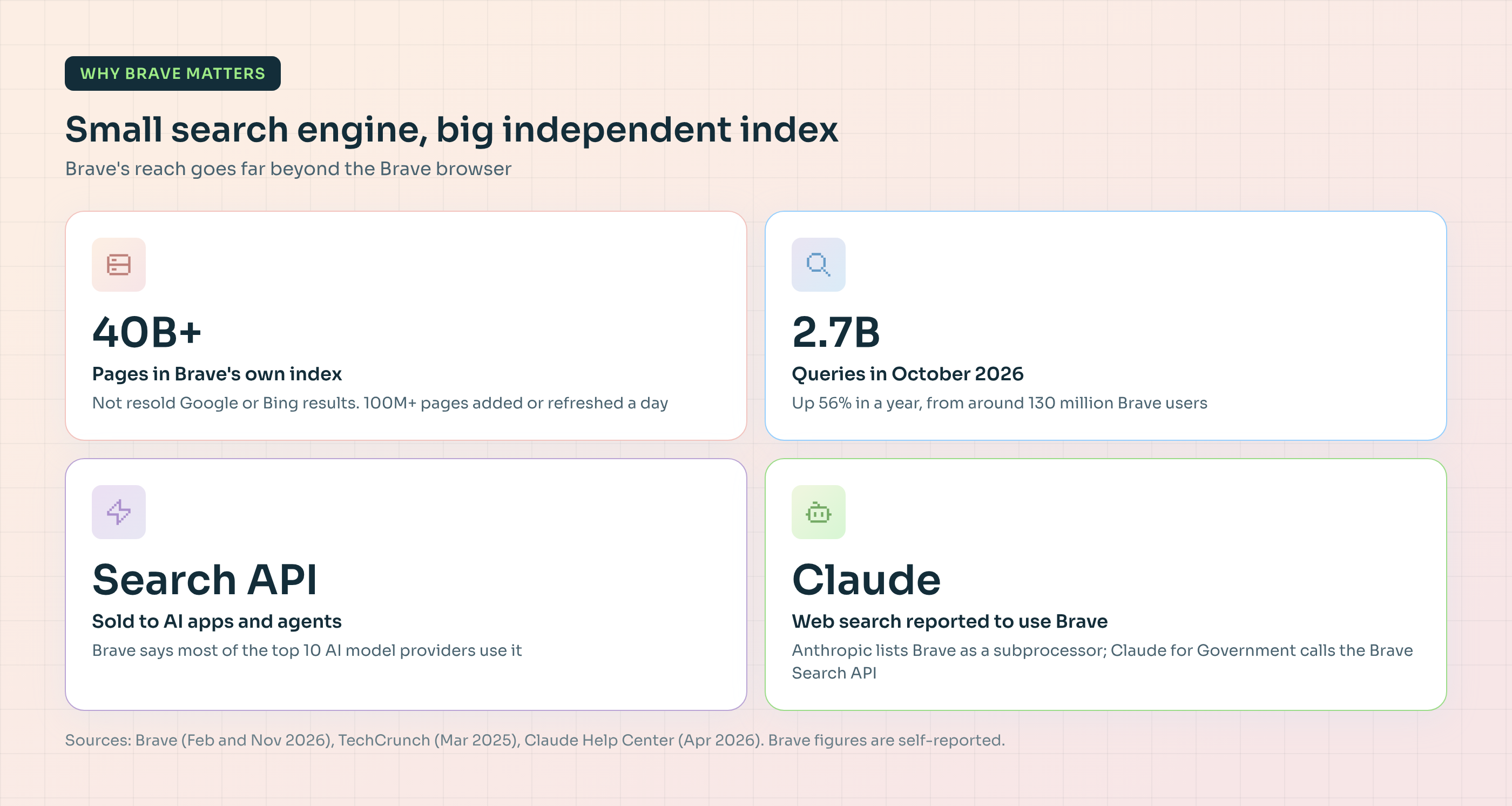
- Brave SEO matters less for the clicks and more for where Brave’s index ends up. Brave Search runs its own independent index of around 40 billion pages, answered 2.7 billion queries in October 2026, and sells that index through the Brave Search API to AI apps and agents. Claude’s web search has been reported to use Brave since 2025.
- Brave is not a Google or Bing copy. It crawls and ranks with its own infrastructure, so ranking on Google doesn’t guarantee you’re in Brave. Run a site: check before you assume anything.
- There’s no Brave Search Console. You can’t submit a sitemap, see impressions or inspect URLs the way you do in Google Search Console or Bing Webmaster Tools. You measure Brave with site: searches, manual checks, server logs and analytics.
- The crawler rules are simple and strict. If Googlebot can’t crawl a page, Brave’s crawler won’t either. robots.txt doesn’t stop indexing; only noindex does. You can ask Brave to re-fetch a URL through its submit page.
- Brave’s ranking leans on real user behaviour. Brave says it uses keyword matching, freshness, clicks, time on page and popularity, much of it from the opt-in Web Discovery Project. Pages people actually click and read win.
- Brave’s AI answers lean heavily on third-party sources. In our live checks, Brave’s AI answers cited Reddit threads and independent listicles far more than vendor websites, even when a vendor’s own page ranked first in the organic results below.
- Brave traffic is small but high quality. For one of our HR tech clients, Brave sent 138 sessions in 12 months with an engagement rate 47% above the site average. Claude sent 132 sessions with a key event rate almost four times the site average.
- What to do: keep your site open to Googlebot, fix indexing with noindex (not robots.txt), check your key URLs in Brave, write pages people want to read to the end, earn mentions in the listicles and communities Brave’s AI cites, and measure Brave and Claude referrals separately.
After I published our Bing guide, the first question in my inbox was: “OK, and what about Brave?” Fair question. Brave is the search engine most B2B marketers have heard of but never checked. Their buyers don’t use it much, so why bother?
Here’s my answer: you’re probably not optimising for Brave Search users. You’re optimising for Brave’s index, because that index now sits behind a growing number of AI tools, and it works very differently from Google and Bing. As I keep telling clients:
“There’s nothing that is just for GEO or just for SEO. When I’m working on your website, it doesn’t mean that I’m just working for SEO, it’s also GEO.” – Romana Kuts, Founder at SaaStorm, on a call with a prospect
This guide is for B2B SaaS marketing leads and SEO teams who already rank on Google and want to know whether Brave deserves time. It matters because Brave’s results increasingly show up inside AI tools your buyers use, not only on search.brave.com. By the end, you’ll know how to check your Brave visibility in ten minutes and what to fix first.
In this guide I’ll explain how Brave Search works, how it finds and ranks pages, what’s different from Google and Bing, how to check whether Brave has indexed your site, and how to measure Brave when there’s no console. I’ll show you live Brave Search results for two of our clients, plus anonymised analytics data on what Brave and Claude traffic actually looks like.
What is Brave SEO?
Brave SEO is the work of getting your pages crawled, indexed and ranked in Brave Search, and cited in the AI answers Brave builds on top of its index. That includes Brave’s own “Ask Brave” and AI answers, and the AI products that pull results from the Brave Search API.

Why Brave Search matters for B2B SaaS in 2027
Let’s be honest about the numbers first. Brave is still small next to Google. But it’s growing fast, and its index travels much further than its own search page.
Brave is growing quickly
Brave Search launched in early March 2021 and became the default in the Brave browser for many users later that year. Today it’s much bigger: it answered 2.7 billion queries in October 2026, up 56% from 1.73 billion a year earlier, according to Brave’s own figures. The Brave browser has around 130 million monthly users. That’s still a fraction of Google, but it’s no longer a niche experiment.
Brave’s index is independent
Most “alternative” search engines resell Google or Bing results. Brave doesn’t. It runs its own index, which Brave says covers more than 40 billion pages and adds or refreshes over 100 million pages a day. Brave calls it one of only three web search indexes at scale in the West, next to Google and Bing.
That matters because Microsoft shut down the public Bing Search API in August 2025. AI companies that need fresh web results now have very few independent options, and Brave is one of them.
Brave’s index feeds AI tools, including Claude
This is the part that made me take Brave seriously. Brave sells access to its index through the Brave Search API, and says most of the top ten AI model providers use it for real-time web data. Its own Ask Brave feature produces around 22 million AI answers a day.
The best-known example is Claude. When Anthropic launched web search for Claude in March 2025, TechCrunch reported strong evidence that it runs on Brave Search: Anthropic added Brave to its list of data subprocessors, and a developer found that Claude’s citations matched Brave’s results for the same query. Anthropic’s own help page for Claude for Government says its web search connector calls the Brave Search API.
Brave users are not average users
Brave positions itself as a private search engine: no account needed, no tracking of your searches, no user profiling, ads that don’t follow you around, and an own search index that isn’t controlled by Big Tech. That’s a real difference from most search engines that sell themselves on privacy. DuckDuckGo, for example, has long relied largely on Bing for its web results, while Brave serves results from its own index. Brave is also an option as the default search engine in other browsers, including Chrome, and it supports “bangs” like !g to jump straight to another site’s search. Brave Search is ad-supported, and Brave has offered an ad-free Premium subscription.
As a privacy-focused search engine, Brave attracts privacy-minded, technical and early-adopter audiences: developers, IT and security teams, founders and people who chose to switch browsers. If you sell developer tools, security, data or infrastructure software, a meaningful slice of your buyers already searches this way.
So the reach is bigger than it looks. Now let’s look at how Brave actually finds and ranks pages, because that’s where it differs most from what you’re used to.
How Brave Search works
Brave Search has three layers you need to understand: how it discovers pages, how it ranks them, and how it builds AI answers on top.
How Brave discovers and crawls pages
Brave has its own crawler, but it doesn’t advertise a separate user agent. The reason is practical: lots of websites only allow Googlebot and block everything else. So Brave follows one rule, straight from its help pages: if a page can’t be crawled by Googlebot, Brave’s crawler won’t crawl it either.
Brave also discovers pages through the Web Discovery Project (WDP), and it doesn’t rely on other search engines to fill its own index. This is an opt-in, privacy-preserving system in the Brave browser. Users who switch it on contribute anonymised data about searches, clicks and the pages they visit. Brave uses it to learn which pages exist, which ones people find useful and which queries are trending, without knowing who contributed what.

How Brave ranks pages
Brave publishes far less about how it ranks results for search queries than Microsoft does for Bing. But from its help pages and the Web Discovery Project documentation, these are the signals it has confirmed:
The pattern is clear: Brave relies more on how real people interact with pages than on a big set of SEO signals. You can’t fake that. You can only earn it.
How Brave builds AI answers
On top of the classic results page, Brave shows AI-powered answers that summarise the top results and cite sources, and Ask Brave, a chat mode with follow-up questions and deep research. Brave says its AI answers are built from its own index and always show where the information came from.
I ran a few B2B queries to see what that looks like in practice. More on that below, because the sources Brave picked were the most useful finding in this whole piece of research.
Brave Search vs Google vs Bing
Here’s how Brave Search compares with the two engines you already optimise for.
The biggest practical difference is the missing console. On Google and Bing you can see what’s indexed and push pages in. On Brave you mostly check and wait. That’s why the technical basics matter even more here.
How to check if Brave has indexed your site
Start with the easiest check of all: the site: operator. Go to search.brave.com and search:
- site:yourdomain.com to see whether Brave has pages from your domain
- site:yourdomain.com/blog/ to check a section
- site:yourdomain.com/your-page-slug/ to check one specific URL
Here’s what that looks like for our own site. Brave has the homepage indexed with sitelinks to pricing, services, careers and contact, plus our tools page.
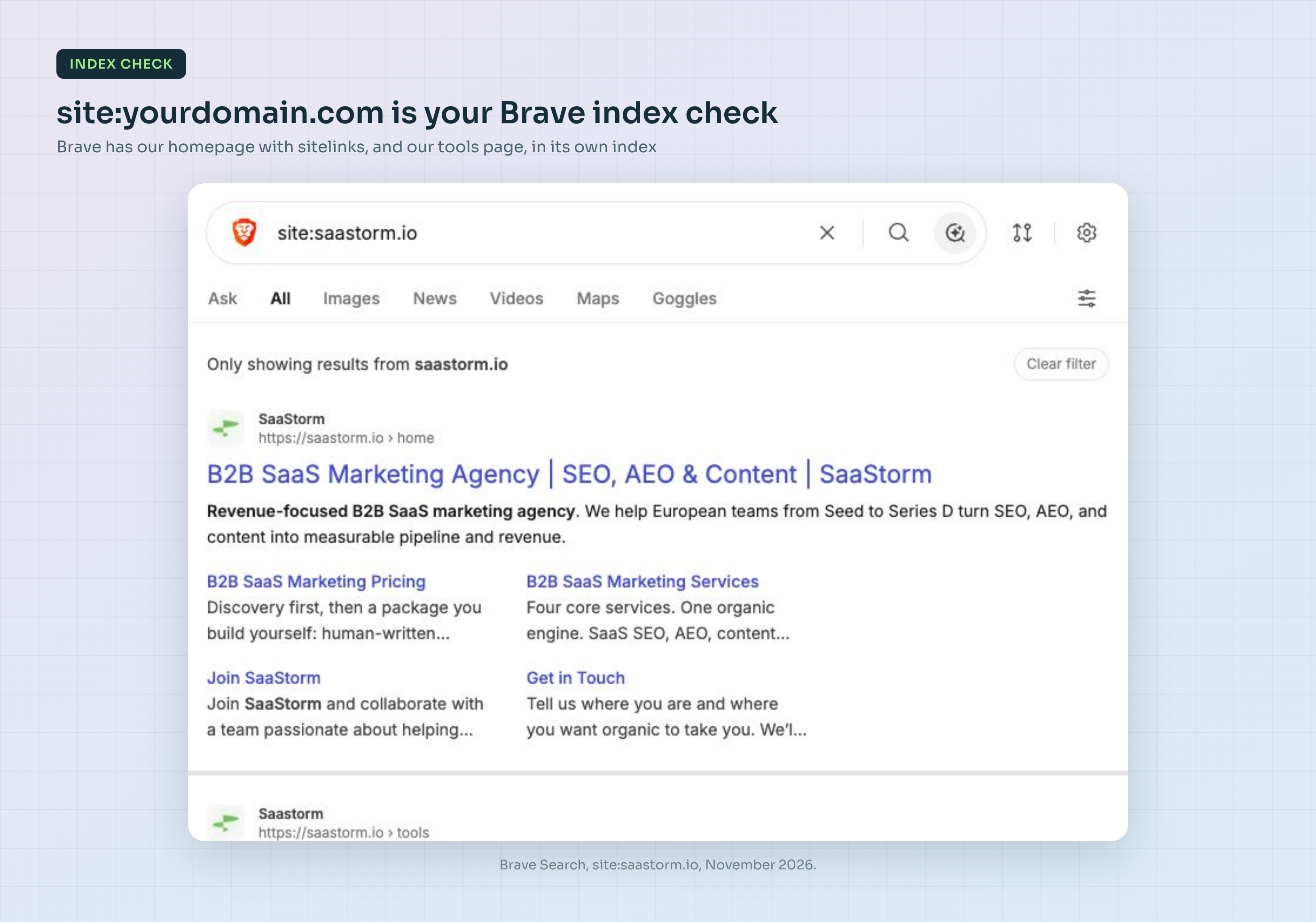
A missing result doesn’t always mean a page isn’t indexed: Brave’s site: results can be incomplete, and its index is still growing. But if your key commercial pages never show up, treat it as a problem.
If a page is missing from Brave
Work through these steps in order:
- Check that the URL returns a 200 status and is publicly accessible.
- Make sure it doesn’t have a noindex tag.
- Check that robots.txt doesn’t block the page or the CSS and JavaScript it needs.
- Confirm Googlebot can crawl it. If Google can’t, Brave won’t.
- Add it to your XML sitemap and link to it from pages that are already indexed.
- Submit it for re-fetching at search.brave.com/submit-url.
- Check again after a few days.
Being indexed is only the first step, though. The more interesting question is what Brave’s AI answers do with your pages once they’re in.
What Brave’s AI answers cite: two client examples
This is where it got interesting. I searched two buyer-style queries in Brave for categories where we work with clients: climate data (Sylvera) and HR tech (WorkMotion).
A carbon market query: the AI answer names our client, but cites others
For “best carbon credit rating agencies”, Brave’s AI answer names Sylvera in its first sentence, as one of the three leading rating agencies.

But look at the sources Brave used to write that answer: two Reddit threads and an independent “top 8 carbon credit rating agencies” listicle. Not Sylvera’s own website.
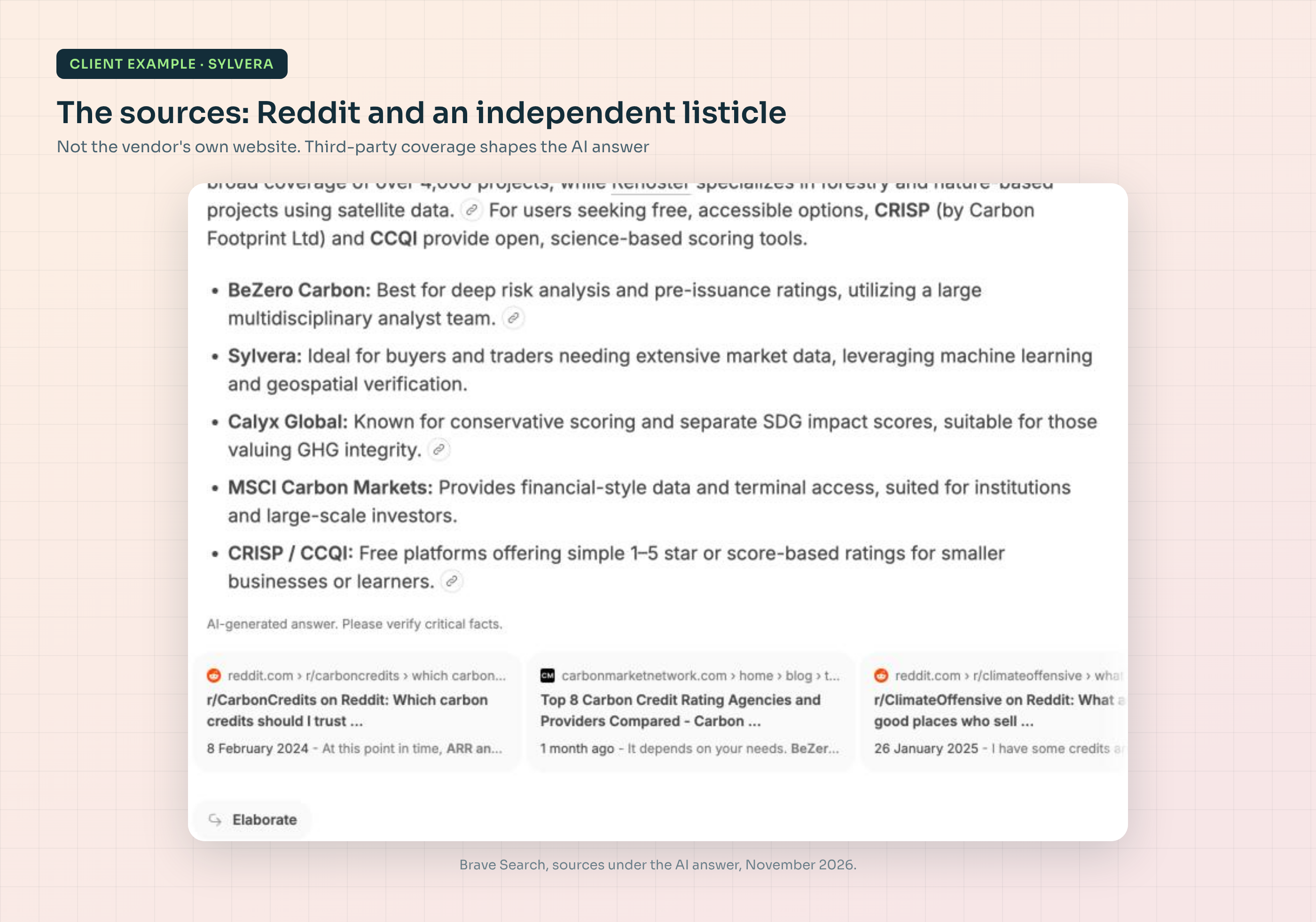
In other words, Brave’s AI recommended Sylvera because independent pages and communities talk about Sylvera. Their own content helps them rank, but the AI answer was built from third-party sources.
An EOR query: number one in organic, fourth in the AI answer
For “best employer of record in Europe”, WorkMotion’s own comparison guide ranks first in Brave’s organic results. That’s a great result. But the AI answer above it starts with Deel, then RemoFirst, and mentions WorkMotion fourth. Its sources? Five Reddit threads.

That’s why off-site work matters so much more now. We cover how we earn those mentions in our guide to SaaS link building. But off-site work only pays off if Brave can reach your own site in the first place, so let’s go back to the technical side.
Technical SEO for Brave
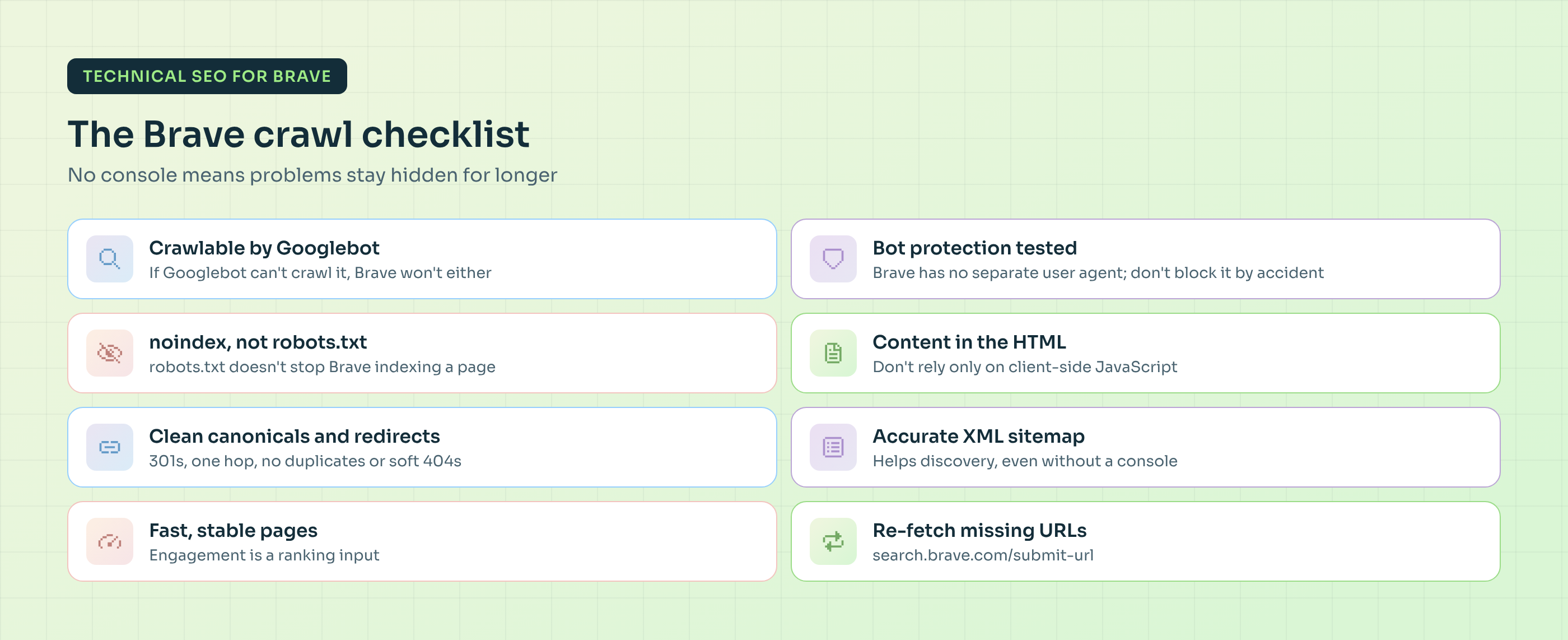
Because Brave gives you so few tools, technical problems stay hidden for longer. Here’s the checklist we run.
- Keep your site crawlable by Googlebot. It’s the prerequisite for Brave crawling.
- Check your bot protection. Brave doesn’t announce a separate user agent, so a firewall or CDN that challenges every unknown bot can stop it quietly. Test that your key pages load for automated requests, not just for Googlebot.
- Use noindex to remove pages, not robots.txt. Brave says robots.txt isn’t used to stop indexing. Brave also has to re-fetch the page before a noindex takes effect.
- Make sure important content is in the HTML. Don’t rely only on client-side JavaScript for the main content of key pages.
- Use clean canonicals, 301 redirects and no redirect chains. Duplicates and soft 404s waste the little crawl attention you get.
- Keep an accurate XML sitemap. You can’t submit it to Brave, but it helps discovery through links and other crawlers.
- Use crawlable internal links (<a href> elements), so Brave can find pages from the ones it already knows.
- Keep pages fast, stable and on HTTPS. Engagement is a ranking input, and slow pages lose readers.
- Keep your HTML clean and add structured data (Organization, Article, FAQ where it fits), so Brave’s crawler and AI answers can read your pages easily.
- Check server logs. Brave doesn’t announce a user agent, but you can still spot unusual crawl patterns and confirm key pages get fetched.
Once the technical side is solid, the rest of Brave SEO is about content people actually engage with.
On-page SEO and content for Brave
Brave confirms that it looks at how closely a result matches the search terms. So clear on-page relevance matters. That doesn’t mean keyword stuffing. It means making the topic of each page impossible to miss.
For every priority page:
- Put the main topic in the title tag and H1. “Brave SEO Guide: How to Rank on Brave Search” beats a clever title that never says Brave.
- Answer the question in the opening paragraph. It helps clicks turn into real visits, and gives AI answers a clean passage to quote.
- Use H2s that sound like real questions, like “How do I check if Brave has indexed my site?”
- Add a TL;DR, a comparison table and an FAQ.
- Use descriptive alt text on your own images.
- Link internally with clear anchor text.
Write for engagement, not just ranking
Because Brave uses clicks and time on page from opted-in users, pages that keep people reading do better. In practice:
- Match your title and meta description to what’s actually on the page.
- Get to the point fast. No long intros before the answer.
- Use real examples, screenshots and data from your own work.
- Remove pop-ups and banners that block the content.
- Make the next step obvious: a related guide, a tool, a product page.
Build original value
Brave positions itself against “SEO spam”, so thin or copied content is a poor fit. Give each page at least one thing nobody else has: first-hand testing, original data, a template or calculator, expert commentary or real screenshots. That’s also what earns links and mentions, which brings us to the part of Brave SEO you can’t do on your own site.
Goggles: Brave’s custom re-ranking
Goggles are Brave’s most unusual feature. They’re sets of rules that re-rank Brave’s results, created and shared by users and communities. A Goggle can boost tech blogs, hide big media sites, prefer independent sources or filter out certain domains.

So on Brave there isn’t always one universal ranking. Someone using a developer-focused Goggle may see a very different results page from someone using the default.
What to do with that:
- Build a brand that communities would want to boost: useful resources, a clear name, honest content.
- Earn mentions in the places those communities trust: newsletters, GitHub, forums, YouTube and niche publications.
- Check your key queries with a few popular Goggles if your audience is technical.
- Don’t build pages just to game one Goggle. They’re user-controlled and change without warning.
Goggles make rankings even harder to pin down, which raises the obvious question: how do you measure any of this?
How to measure Brave SEO without a console
No console doesn’t mean no data. It means you combine a few sources.
What Brave and Claude traffic looks like for our clients
Here’s what I found in GA4 for one of our HR tech clients over the last 12 months. Brave Search sent 138 sessions, about 0.01% of the site’s traffic. Tiny. But those visitors had a 58% engagement rate, 47% above the site average, and converted at a key event rate 59% above average.

Claude.ai sent almost the same number of sessions to the same site: 132. Those visitors were even more valuable: a 61% engagement rate and a key event rate of 5.3%, almost four times the site average. For a climate data client, Brave sent 36 sessions in a year with an engagement rate 39% above average.

So Brave Search on its own won’t move your pipeline. But the AI tools that use Brave’s index send visitors who are further along and ready to act.
If you want to tie these numbers to pipeline, our guide to SEO attribution explains how we connect organic and AI search to deals in the CRM.
A 90-day Brave SEO plan
If you want to put all of this into practice, this is the order we’d follow for a B2B SaaS site.
Days 1 to 14: make Brave able to crawl you. Audit robots.txt, canonicals, sitemaps, status codes and internal links. Confirm Googlebot can reach every priority page. Remove accidental noindex tags. Run site: checks in Brave for your top URLs to set a baseline.
Days 15 to 45: relevance and engagement. Find pages that rank well in Google or Bing but not in Brave. Tighten titles, H1s, intros and internal links. Add direct answers, tables and FAQs. Refresh outdated pages properly. Submit missing URLs through Brave’s re-fetch page.
Days 46 to 75: earn attention. Publish one original resource: research, a tool or a detailed guide. Share it in the communities your buyers use. Earn mentions in the listicles and Reddit threads Brave’s AI cites for your category.
Days 76 to 90: AI answers and measurement. Search your target queries in Brave and note which sources the AI answer cites. Add Brave and Claude referrals to your monthly report. Close the gaps where competitors get named and you don’t.

Bonus: using the Brave browser for SEO work
A quick side note, because people often mix up Brave Search and the Brave browser. The browser is built on Chromium, so it runs Chrome Web Store extensions, DevTools and Lighthouse, which makes it perfectly fine for SEO audits. Two things to know if you use it for that work:
- Shields can change what you see. Brave blocks third-party ads and trackers by default, which can hide cookie banners, chat widgets or tracking scripts and even break some layouts. Turn Shields off for the site you’re auditing to see what a normal visitor sees.
- It’s handy for cleaner SERP checks. Because Brave doesn’t personalise results based on a profile, it’s a quick way to see a less personalised view of Brave’s own results.
Using the Brave browser won’t improve your Google rankings, of course. It’s just a useful, privacy-friendly tool for research.
Common Brave SEO mistakes
These are the ones we see most often when we check a SaaS site for Brave:
- Assuming Brave shows the same results as Google. It has its own index.
- Blocking every crawler except Googlebot by user agent. Brave doesn’t announce itself, so test what your bot protection actually blocks.
- Using robots.txt to remove pages. Use noindex.
- Ignoring engagement because Brave doesn’t show you a dashboard.
- Optimising only your own pages while the AI answer is built from Reddit and listicles.
- Chasing Goggles instead of building authority.
- Publishing thin AI content with nothing original in it.
- Measuring only rankings, not Brave and Claude referrals and what they convert to.
The bottom line
Brave Search is small, but its index isn’t. It powers Brave’s own AI answers, a search API used by AI products, and, as reported, Claude’s web search. For B2B SaaS, that makes Brave SEO less about Brave users and more about being findable in the AI tools your buyers use.
The work is mostly fundamentals: be crawlable, use noindex correctly, check your key pages are indexed, write content people actually read, and earn the third-party mentions that AI answers lean on. Then measure Brave and Claude traffic separately, because small numbers can still mean very good buyers.
Want to know how your site shows up across Google, Bing, Brave and the AI tools built on them? Talk to our team and we’ll show you where you’re visible and where you’re missing.
00:00
/
00:00
FAQs
How do I rank on Brave Search?

Make sure Googlebot can crawl your pages (Brave’s crawler follows the same limits), use noindex rather than robots.txt to keep pages out, and check your key URLs with site: searches. Then write pages that clearly match the query and keep people reading, and earn links and mentions from credible third-party sites.
Does Brave have a webmaster tool like Google Search Console?
No. Brave doesn’t offer a console with indexing, performance or sitemap reports. You can ask Brave to re-fetch a URL at search.brave.com/submit-url, and measure Brave with site: searches, manual rank checks, server logs and analytics.
How do I check if Brave has indexed my site?
Search site:yourdomain.com on search.brave.com. To check one page, search site: followed by the full URL. A missing result isn’t always final proof, but key pages that never appear need a technical check.
Does Brave use Google results?
Brave says its search results are served from its own independent index. It doesn’t rely on Google or Bing for its core results.
What is the Brave Web Discovery Project?
It’s an opt-in, privacy-preserving system in the Brave browser. Users who switch it on contribute anonymised data about searches, clicks and pages visited, which Brave uses to discover pages and understand which results people find useful.
Does Claude use Brave Search?
TechCrunch reported in March 2025 that Claude’s web search appears to use Brave Search, based on Anthropic listing Brave as a subprocessor and matching citations. Anthropic’s help page for Claude for Government says its web search connector calls the Brave Search API.
What are Brave Goggles?
Goggles are custom rule sets that re-rank Brave Search results. Anyone can create or follow one, for example to boost tech blogs or independent sources. They don’t replace being indexed and relevant in Brave’s default results.



“SaaStorm became a key part of our inbound motion. Their SEO and content support helped us scale a consistent flow of high-intent traffic and build a content engine that supported £250K+ in inbound revenue. They plugged into our system and delivered every step of the way.”
Jonny Butler, Head of Marketing at OneUp
Related posts