Back to blog
Content Pruning for SEO: Should You Delete, Merge or Keep Old Blog Posts?
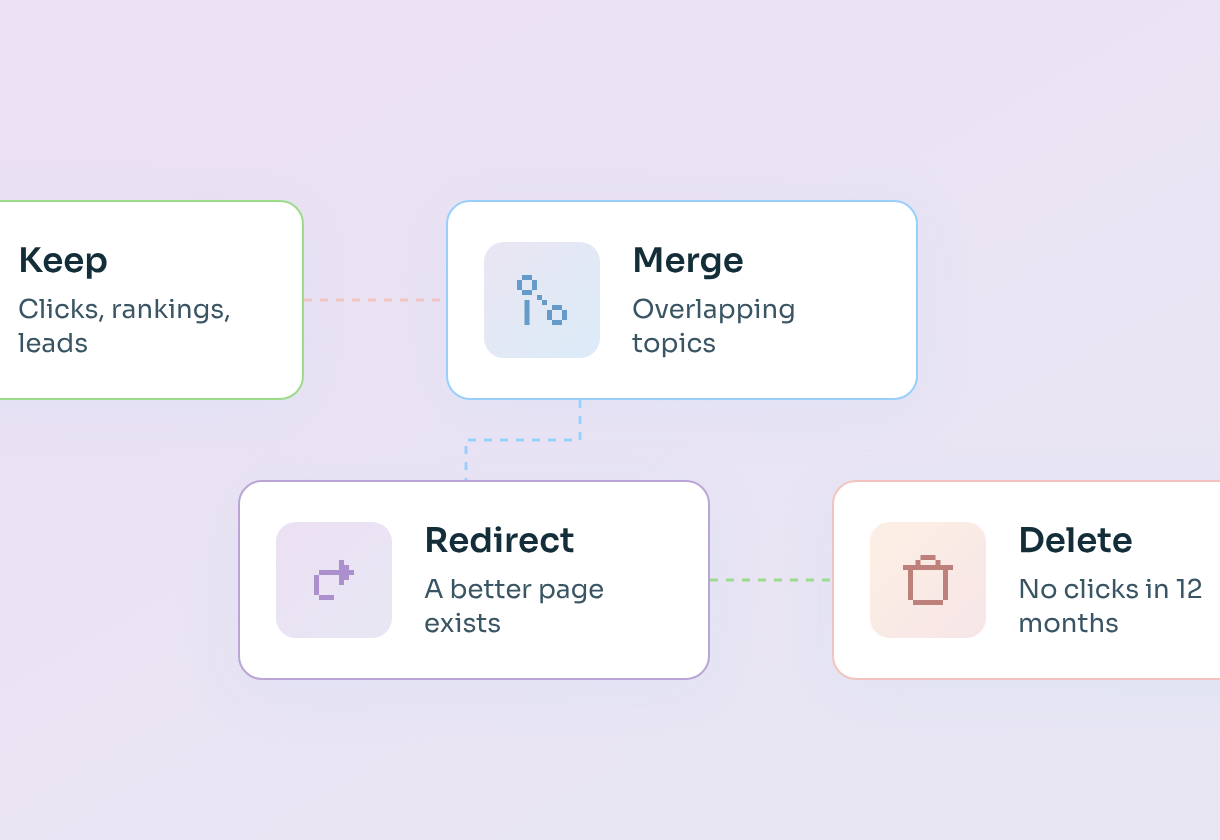

- Content pruning means reviewing every page on your blog and deciding whether to keep it, merge it, redirect it or delete it. It isn't just deleting.
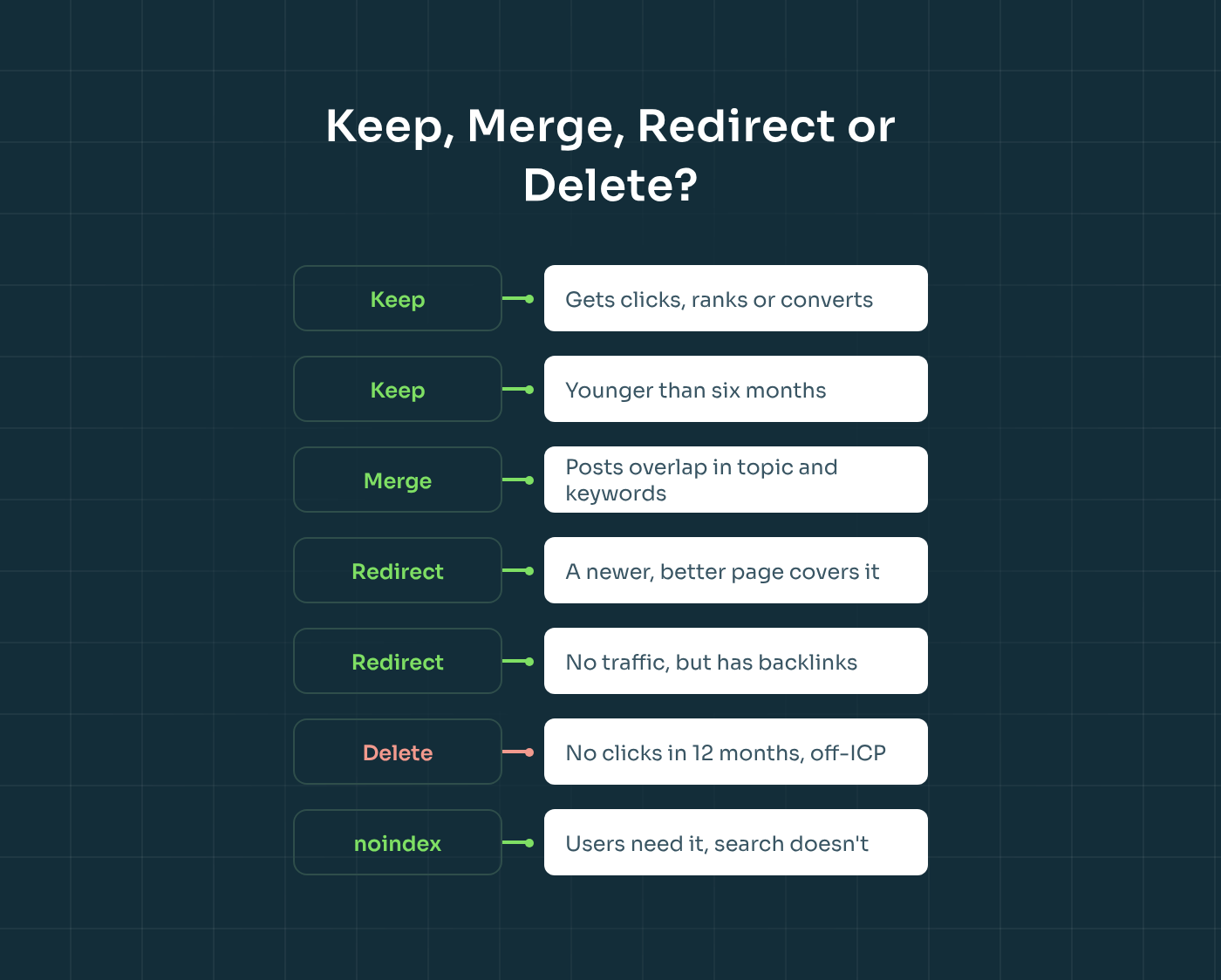
- Delete when a page has had no clicks in 12 months and the topic no longer fits your product or ICP. Merge when several posts overlap in topic and keywords and would be stronger as one guide. Redirect when a newer or better page already covers the same thing.
- In the AI era, many SaaS teams publish faster than they plan, and they end up competing with themselves. When that happens, you stop growing, and the extra content actively hurts you.
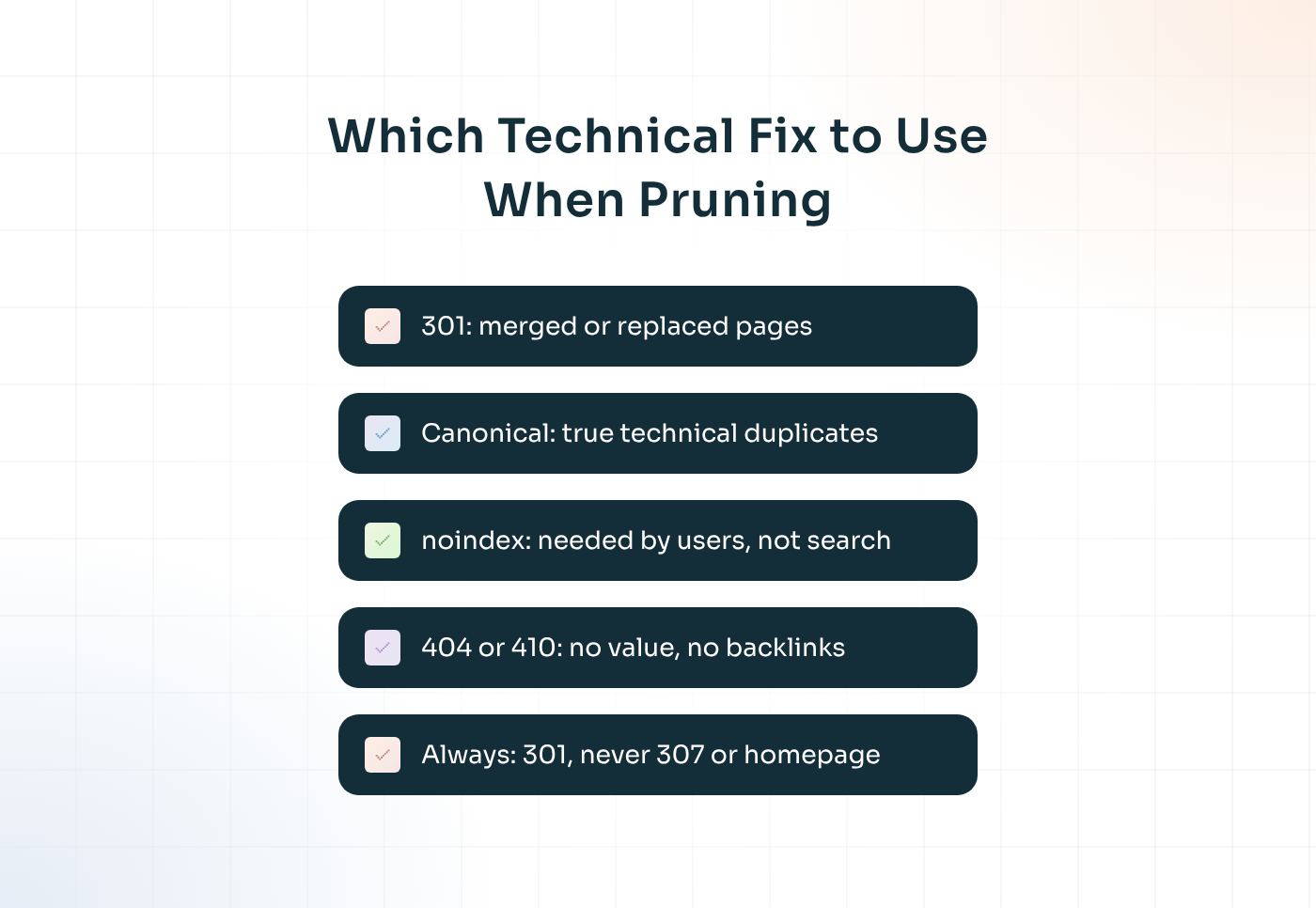
- Use 301 redirects for anything you merge or replace, canonicals only when both pages genuinely need to exist, noindex for pages users need but search doesn't, and a 404 or 410 for content with no value left.
- Prune from data, not gut feeling, and plan the redirects before you delete anything.
Every engagement we run at SaaStorm starts with a discovery phase, and one of the first things we do in it is an audit of all the existing content. We check every blog post, landing page and resource, see what's ranking and what isn't, and look for cannibalisation – two or more of your own pages competing for the same keyword.
What we find is remarkably consistent. Most SaaS companies have published plenty of content, but very few have been strategic about it. We regularly see three articles answering the same question, posts that are 300 words long, old product announcements nobody reads, and blogs spread across several subdomains that were never redirected properly.
"If a client comes to us with existing content, in 90% of cases they were never strategic about it. So we don't just optimise everything. We ask: does this article even make sense? Should we redirect it, merge it or delete it?" – Romana Kuts, Founder at SaaStorm
That's what content pruning is about. In this guide, I'll walk you through how we decide what to keep, merge, redirect or delete, how to run the audit step by step, and how to handle the technical side – 301 redirects, canonicals, noindex, 404s and 410s – without losing the rankings you already have.
What content pruning SEO is (and what it isn't)
Before we get into the framework, it helps to clear up one misunderstanding. When people hear "content pruning", they usually picture deleting old blog posts. Deleting is part of it, but it's the smallest part.
Content pruning is the process of reviewing your existing content and deciding the best next step for each page, from high quality content that just needs an update to low quality content that's dragging the rest of your site down. That step can be keeping it as it is, refreshing it, merging it with similar posts, redirecting it to a better page or removing it completely. The goal isn't a smaller blog for its own sake. It's a blog where every page has a clear job, targets its own keyword and helps a buyer move closer to a demo.
It's also worth saying that pruning doesn't always mean change. One of our clients asked whether they should delete or unpublish a couple of dozen older posts. When we looked, those posts weren't hurting anything: there was no cannibalisation, no technical burden and no confusion for search engines. So our answer was to leave them alone and focus on new content. A good audit tells you when to act and when not to.
That's why we don't start with a deletion target. We start with data and a clear set of rules, which is what the next section is about.
Why content pruning matters more in the AI era
The reason this topic comes up on almost every discovery call now is simple: SaaS companies are publishing more than ever. AI tools make it easy to produce ten articles in an afternoon, and many teams have done exactly that, without checking what they'd already written.
The result is a blog that competes with itself. You end up with "what is X", "X explained" and "a guide to X" all targeting the same keyword, none of them strong enough to win. Google has to guess which page to rank, so it often ranks none of them well. AI assistants such as ChatGPT and Perplexity face the same problem: when your site has five thin answers to one question, they're less likely to cite any of them.
"With AI, people started creating a lot of content without thinking about cannibalisation. And then you just stop growing. You're actually hurting yourself, so you need to change it." – Romana Kuts, Founder at SaaStorm
Pruning fixes that by turning scattered, overlapping, low performing pages into a smaller number of strong ones. It also makes your entire site easier for crawlers to understand. Crawl budget is rarely a real problem for a SaaS blog with a few hundred posts – it matters far more for large websites with thousands of URLs – but clarity always matters, for both SEO and GEO. So how do you decide what happens to each page?
How we decide: keep, merge, redirect or delete
Every page in the audit ends up in one of four buckets. The rules below are the ones we use in every SaaStorm discovery phase, and they're deliberately simple, so anyone on your team can apply them consistently.
Keep (and often refresh)
Keep a page when it gets clicks, ranks for a relevant keyword, brings in leads or supports sales. Keep it too when it's still young – a page published three months ago hasn't had time to prove itself yet, and our guide to how long SEO takes explains why.
Keeping doesn't mean ignoring. Many of the pages we keep go straight into the refresh plan, especially pages sitting just outside the top 10, where an update can move them onto page one quickly.
Merge
Merge when two or more posts overlap in topic and keywords. Instead of three weak articles on the same subject, you create one better guide that covers everything properly, then 301 redirect the old URLs to it.
Merging is often the easiest win in the whole audit. You keep the best sections, the backlinks and the rankings from each version, and you give search engines one clear page to rank. It's also the most common fix for cannibalisation, because the overlap disappears the moment the pages become one.
Redirect
Redirect when a page has a direct replacement: you've already published a newer, better article on the same topic, or the old page covers something your new page does better. In that case, there's no point optimising the old one.
I had exactly this situation when reviewing a client's optimisation list. One of the articles we'd been asked to optimise covered the same topic as a new, stronger piece we'd published a month earlier. Optimising both would have meant competing with ourselves, so we redirected the old one to the new one and moved on.
Delete
Delete when a page has had no clicks in 12 months, the topic is no longer relevant and it doesn't fit your ICP. Typical examples are old event recaps, announcements for features you no longer offer, off-topic posts written for traffic and very thin articles with nothing worth saving.
Before you delete, check two things. First, backlinks: if other sites link to the page, redirect it to the closest relevant page instead, so you keep that authority. Second, non-search value: some pages get no organic traffic but are used by sales, support or customers. Those stay, even if Google ignores them.
Here's the framework in one view:
The content pruning process: how to run a content audit, step by step
Knowing the rules is one thing; applying them across hundreds of URLs is another. This is the process we follow in discovery, and it works whether you have 40 posts or 4,000.
1. Collect every URL you have
Start by building a complete list of your pages, not just the ones in your blog feed. Pull URLs from Google Search Console, your XML sitemap, your list of indexed pages, your CMS export and a crawl in a tool like Semrush or Screaming Frog. Then compare the lists, because they rarely match.
This step is where the surprises happen. One client had around five different blogs across subdomains and subfolders, built over the years by different teams – and not all of them were redirected to the main site. You can't prune what you can't see.
2. Pull 12 months of performance data
For every URL, add clicks, impressions and average position from Search Console, sessions and conversions from Google Analytics, and referring domains and external links from your backlink tool. Twelve months is the right window for most SaaS blogs: long enough to smooth out seasonality, short enough to reflect your current positioning.
3. Map each page to a keyword, topic and funnel stage
Next, give every page a main keyword and a topic, and note whether it's top, middle or bottom of the funnel. Our keyword mapping guide explains how. This is the step that shows you relevance and search intent: does this page still match what you sell, who your target audience is and what they're actually searching for? Outdated content and outdated information usually stand out here too: old pricing, retired features, screenshots of a product that no longer looks like that.
4. Spot the cannibalisation
With keywords mapped, look for duplicates: two or more pages targeting the same keyword or answering the same question. In Search Console, you can check the Pages tab for a query and see whether several of your URLs are getting impressions for it. If they are, and positions keep swapping, you've found a merge or redirect candidate.
5. Decide, and build the redirect map before touching anything
Now apply the framework to every row: keep, refresh, merge, redirect, delete or noindex. Then, before anything is deleted, build a redirect map – a simple sheet with the old URL in one column and the new URL in the other.
When we prepared a client's website migration, the content audit came first, then the redirect map, then the rest. Every page marked as "retire" automatically got a 301 to its closest replacement. Only after that did we move the remaining content into the content plan, split into what needed refreshing, optimising or rewriting.
6. Implement, then clean up the internal links
Set up the redirects, remove or merge the pages, update your sitemap and – the step people forget – update internal links. Fix the internal links pointing to removed or redirected URLs, so link equity flows straight to your important pages. If your other articles still link to a URL you've redirected, you're sending users and crawlers through an extra hop every time.
7. Monitor for the next few weeks
Finally, watch Search Console for crawl errors, unexpected 404s and pages dropping out of the index. A short dip after a big prune is normal; a long one usually points to a redirect that's missing or pointing to the wrong place.
The technical side: 301s, canonicals, noindex, 404 and 410
Most pruning mistakes aren't strategic. They're technical: the right decision, implemented the wrong way. Here's how each option works and when to use it.
301 redirects
A 301 is a permanent redirect, and it's the right tool for anything you merge or replace. According to Google's guidance on redirects, permanent redirects tell Google the target should become the canonical URL, so the new page is the one that shows up in search.
Two rules matter most. First, redirect to the most relevant page, not your homepage. A post about pricing models should point to your pricing guide, not to the front page. Second, use a 301 (or 308), not a temporary 302 or 307. Google doesn't treat temporary redirects as a canonical signal, so the old URL can hang around in search results. We found exactly this on one client's site: their redirects had been set up as 307s, so we switched them to 301s as a priority fix. And avoid redirect chains – if A redirects to B and B to C, point A straight to C.
Canonical tags
A canonical tag tells search engines which version of a page is the main one when several similar versions need to exist – for example, the same content under different URL parameters, or near-identical pages for different regions. Google describes rel="canonical" as a strong signal, alongside redirects.
The important word there is "need". If both pages don't need to exist, a canonical is a shortcut rather than a fix. When two blog posts cover the same topic, merge them and redirect. Use canonicals for genuine technical duplicate content, not for editorial overlap.
noindex
A noindex tag keeps a page live for users but out of search results. It's useful for pages people need but searchers don't: thank-you pages, gated content, internal resources, some customer-only documentation.
Don't use noindex to solve duplicate content between two of your own pages – Google doesn't recommend it for choosing a canonical, because it hides the page completely. And don't combine noindex with a canonical on the same page; the two send opposite signals. The same goes for robots.txt: blocking a page there stops Google from crawling it, but doesn't reliably remove it from the index.
404 and 410
When a page has no value left – no traffic, no backlinks, no relevance – the simplest option is to remove it and let it return a 404 (not found) or 410 (gone). Google treats all 4xx errors the same way: it drops the URL from the index if it was indexed before. A 410 makes your intent explicit, but in practice either works.
What you want to avoid is a soft 404: a page that says "not found" but returns a success code, or a deleted post that quietly redirects to the homepage. Both confuse search engines and users. If there's a relevant replacement, use a 301. If there isn't, let it 404.
Common content pruning mistakes
Even with the right framework, a few mistakes come up again and again. Most of them happen because pruning is treated as a clean-up task rather than an SEO project.
The first is deleting pages that have backlinks. Those links are authority you've already earned, and a 404 throws it away. Redirect them to the closest relevant page instead.
The second is redirecting everything to the homepage. It feels tidy, but Google often treats it as a soft 404, and users land somewhere that doesn't answer their question.
The third is pruning on traffic alone. A page with no organic clicks can still be one your sales team sends to every prospect, or one that converts the few visitors it gets. Check conversions and ask sales before you delete.
The fourth is pruning too early. Pages younger than six months, and pages in a brand-new topic cluster, often haven't had time to rank. Give them a chance before judging them.
And the last is forgetting the follow-up: internal links that still point to old URLs, sitemaps that still list deleted pages and redirects that were never tested.
What happens after you prune
The honest answer is: it depends on how much was holding you back. If your blog had heavy cannibalisation or lots of thin content, the effect can be significant.
Published case studies show what's possible. Inflow pruned around 200 pages – about 10% of an ecommerce brand's blog – and saw organic sessions rise by 104%. In an Ahrefs roundup, HubSpot's Victor Pan described removing around 3,000 pages from the sitemap to speed up indexing, and Belkins reported going from around 3,000 to almost 10,000 monthly organic visits after pruning 400 low-quality pages. Expect a short dip in keyword footprint first, then growth in organic traffic as search engines consolidate signals on fewer, stronger pages.
Just as important is what happens to the content you keep. Pruning is the first half of the job; the second is refreshing what's left, so it keeps ranking and keeps getting cited by AI assistants. That's where the content plan from discovery comes in.
The bottom line
Content pruning isn't about having a smaller blog. It's about having a blog where every page earns its place: one page per topic, each with a clear keyword, a clear audience and a clear job in your funnel.
Use simple rules. Keep what performs, merge what overlaps, redirect what's been replaced and delete what has no clicks, no relevance and no backlinks. Then implement it properly, with 301s, clean internal links and a redirect map built before anything goes offline. Done well, pruning stops you competing with yourself and gives your best content the room it needs to grow.
00:00
/
00:00
Not sure which of your posts are helping and which are holding you back? Book a call with us and we'll show you how our discovery phase audits your existing content and builds the plan from there.
FAQs
What is content pruning in SEO?

Content pruning is the process of reviewing existing content and deciding, page by page, whether to keep, refresh, merge, redirect or delete it. The goal is a site where every page targets its own keyword and serves a clear purpose.
Does deleting old blog posts help SEO?
It can, when those posts are thin, outdated, off-topic or competing with stronger pages. Deleting posts that still get clicks, backlinks or conversions usually hurts, so decide based on data rather than age.
Should I delete or redirect an old blog post?
Redirect with a 301 when there's a relevant replacement page or the post has backlinks. Delete and let it return a 404 or 410 when there's no replacement, no backlinks and no remaining value.
What's the difference between a 404 and a 410?
A 404 means "not found" and a 410 means "gone". Google treats both the same way and drops the URL from its index, but a 410 makes it explicit that the removal is intentional.
When should I use a canonical tag instead of a redirect?
Use a canonical when both versions of a page need to stay live, such as URL parameter variants or near-identical regional pages. If one of the pages doesn't need to exist, merge and redirect instead.
How often should you prune content?
For most B2B SaaS blogs, a full audit once a year works well, with lighter checks every quarter. Prune before a website migration, after a big publishing push and whenever you notice several pages competing for the same keyword.
Will content pruning hurt my rankings?
Done properly, it shouldn't. A short dip is normal while search engines process the changes, but rankings usually consolidate on the stronger pages. The risk comes from deleting pages with backlinks or traffic, or from missing redirects.



“SaaStorm became a key part of our inbound motion. Their SEO and content support helped us scale a consistent flow of high-intent traffic and build a content engine that supported £250K+ in inbound revenue. They plugged into our system and delivered every step of the way.”
Jonny Butler, Head of Marketing at OneUp
Related posts